Overview
The Softdrive Console allows administrators to rename a computer (hostname) directly from the dashboard. This is useful for keeping environments organized, applying internal naming conventions, or identifying machines by user, department, or purpose.
Important: The computer name change will only take effect after the computer is restarted.
Prerequisites
Changing the computer name from the Softdrive Console is supported only for the following computer types:
- Standalone computers
- Workgroup-joined computers
This action is not supported for domain-joined computers or Entra Joined computers.
Domain Joined computers
Computers that are joined to a domain (such as Active Directory or hybrid environments) manage their computer name through domain policies and directory services.
Renaming a domain-joined computer outside of domain management tools can result in authentication issues, trust relationship errors, or Group Policy inconsistencies.
For domain-joined computers, hostname changes must be performed using your organization’s domain administration procedures.
Content
Follow these steps to change a computer name
1) Log in to the Softdrive Dashboard
- Open a web browser and go to:
https://softnet.softdrive.co/ - Log in using your administrator credentials.
2) Locate the Computer
- Navigate to the Computers tab.
- Use the Search option to find the computer..
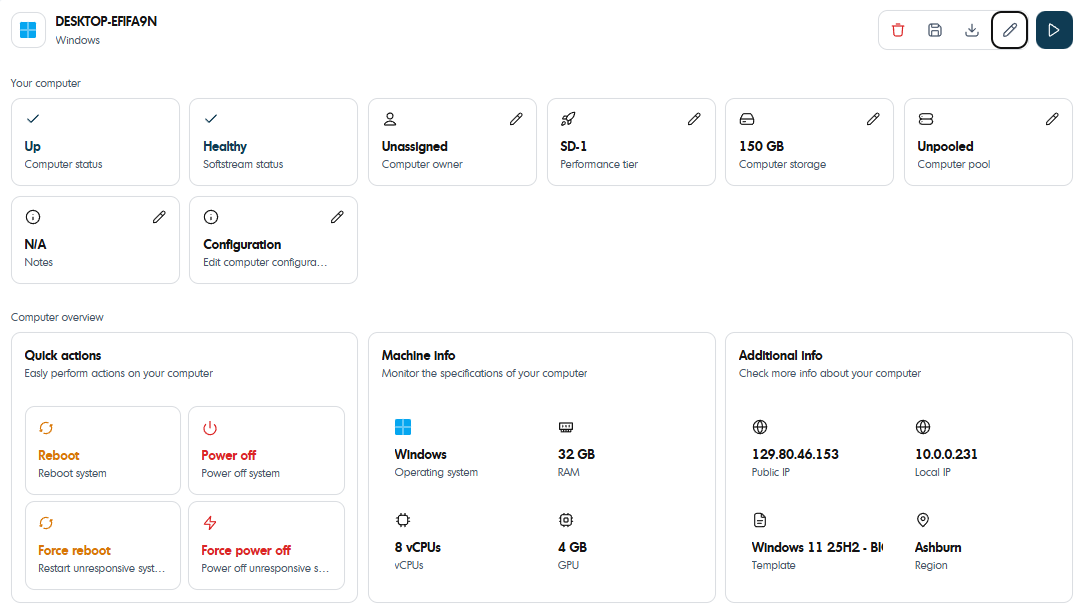
- Click the computer to open its Details page.
3) Open Change Hostname Settings
- On the Computer Details page, locate the Edit button on the top right hand side.

4) Change the hostname
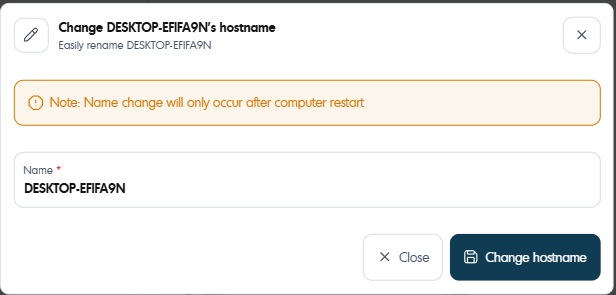
4) Restart the computer to apply the change.
Best Practices
- Use clear and consistent naming conventions.
- Avoid spaces and special characters in computer names.
- Schedule the restart during a maintenance window to avoid interrupting users.
- Verify whether a computer is domain-joined before attempting to rename it.
Was this article helpful?
That’s Great!
Thank you for your feedback
Sorry! We couldn't be helpful
Thank you for your feedback
Feedback sent
We appreciate your effort and will try to fix the article